Magnetic Weapon Holsters Native Support
This tutorial will explain how you can natively support Magnetic Weapon Holsters in your custom weapon mod WITH OUT PATCHES.
I want to thank TheOGTennessee for his efforts figuring out how Magnetic Weapon Holsters works and graciously sharing it with the modding community
Table of Contents
Information
Magnetic Weapon Holsters works by attaching specifically named and configured keywords, up until now we assumed it used the FormId to do its magic.
What was discovered is that it does not matter where the keywords originated from, so you can create these keywords in your mod, add them to your custom weapon form and its automatically supported when a user has Magnetic Weapon Holsters installed along with your mod.
If a user doesnt have Magnetic Weapon Holsters installed then the keywords effectively do nothing, meaning it costs basically nothing for you to add this to your mod with zero down sides.
Keyword Setup
There are two keywords, you only need the one you are going to use, if you have both sidearms and melee then you will need both.
xR_Holster (Sidearms)
This keyword is used for sidearms.
- Create a new keyword with the ID
xR_Holster - Set the keyword type to
WeaponHolster
You can set the color exactly as below if you want to, but it does not seem to need it.
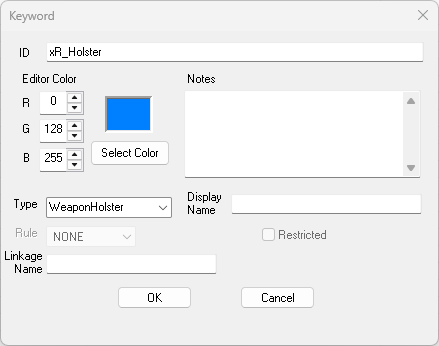
xR_Holster Keyword
xR_HolsterMelee (Melee Weapons)
This keyword is used for melee weapons.
- Create a new keyword with the ID
xR_HolsterMelee - Set the keyword type to
WeaponHolster
You can set the color exactly as below if you want to, but it does not seem to need it.
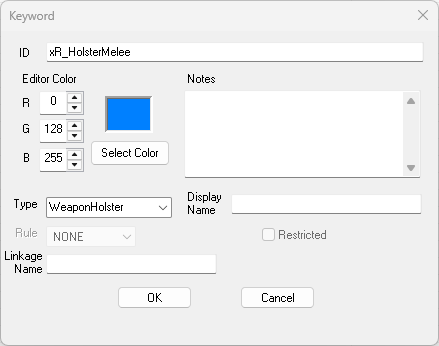
xR_HolsterMelee Keyword
Adding it to your weapon
All that you need to do now is just add it to your weapons Keywords on the General tab.
I didnt take a screenshot as it should be well known how to add a keyword to a weapon
Final Thoughts
Thats it! Thats all you have to do and now your weapon will natively be supported by Magnetic Weapon Holsters with out a patch.
If you have questions, or run into issues, feel free to reach out to me.